This guide covers the price, the steps, the QR code rules, and the phones that work. Every detail comes from Zong's own website.
Is eSIM Available in Zong?
Yes. Zong's eSIM page explains it clearly. An eSIM is a digital SIM built into your phone. It lets you use a mobile number without a plastic SIM card.
You can get one in two ways:
- Book Your Number: you take a new Zong number as an eSIM.
- Replacement: you swap your current Zong number onto an eSIM.
Zong eSIM Price and Charges
Zong's SIM price page lists the eSIM charge at Rs. 1,500. The eSIM page says the same, and names Zong Customer Service Centres for this charge.
Some websites show Rs. 2,000. Zong's own pages show Rs. 1,500, so use that number as your guide.
Here is how it compares with other Zong SIM charges:
| Item | Price (Rs.) |
|---|---|
| Prepaid new SIM | 300 |
| Data SIM | 300 |
| Change of SIM | 400 |
| eSIM | 1,500 |
Zong can update prices at any time. Call 310 from a Zong number to confirm before you visit.
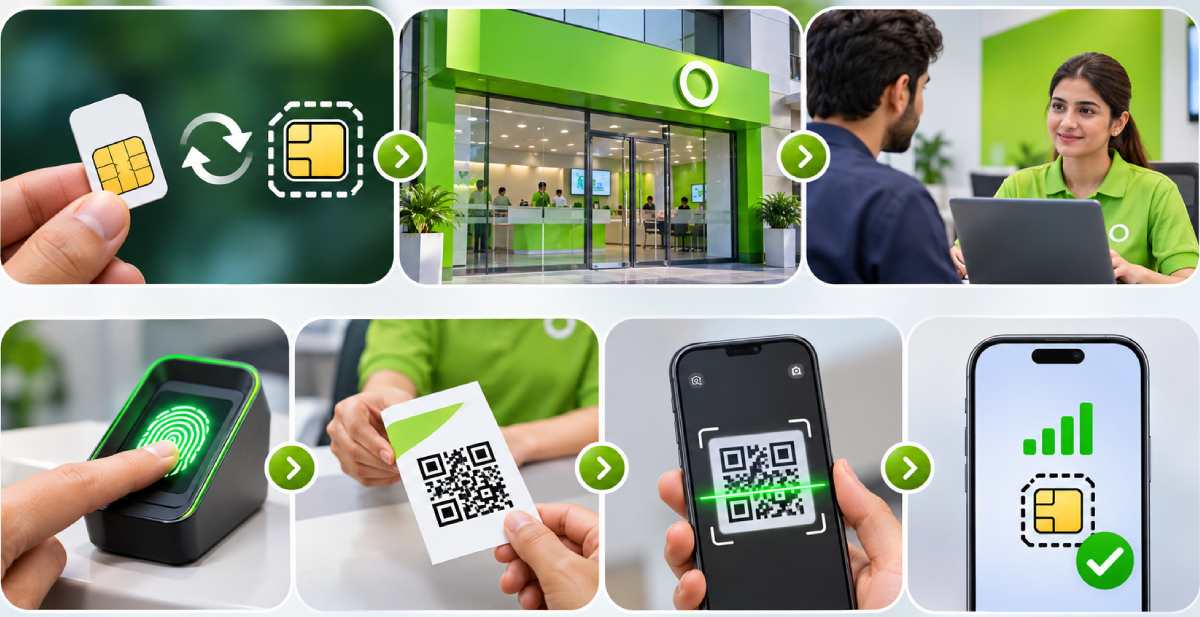
How to Get a Zong eSIM
You cannot skip the visit. Zong's process runs through a service point.
- Go to your nearest Zong Customer Service Centre or franchise.
- Say if you want a new number (Book Your Number) or a replacement for your current Zong number.
- Complete the biometric (BVS) check. Zong says it is required before activation.
- Zong links your mobile number and SIM details (MSISDN and ICCID) to an eSIM profile.
- You receive a printed voucher with your eSIM QR code.
- Scan the QR code on your phone to download the profile.
How to Convert Zong SIM to eSIM
If you already use Zong, you can move your number to an eSIM. Zong calls this a replacement.
Visit a Zong Customer Service Centre or franchise and ask to replace your SIM with an eSIM. After the biometric check, staff link your number to the eSIM profile and hand you the QR code voucher.
Zong says your current services and tariffs carry over to the new eSIM. Check that your phone is on Zong's supported list before you go.
Zong eSIM Activation on iPhone and Android
Connect your phone to Wi-Fi or mobile data first. The profile needs internet to download.
iPhone
- Check that your iPhone runs iOS 12.1 or later.
- Open Settings and tap Cellular.
- Tap Add Cellular Plan. The camera opens.
- Scan the QR code from your voucher.
- If the phone asks for a code, enter 0000. Zong's SIM price page names this as the default code.
Android
- Update your phone to the latest software.
- Open Settings and go to SIM Card Manager.
- Tap eSIM, then Add Mobile Plan. The camera opens.
- Scan the QR code.
- If the phone asks for a PIN, enter 0000.
Menu names can differ by brand. If you cannot find these options, search "eSIM" in your phone settings.
Zong eSIM QR Code: Download and Rescan
The QR code is how you download your eSIM profile. Zong hands it over as a physical voucher.
Keep it private. Zong says not to share the QR code with anyone, for security reasons.
Download timing. The profile can only be downloaded after Zong maps your eSIM to your number. You cannot download it before that.
How many times can you scan it? Zong does not state a fixed number. It does say you can scan the same QR code again in two cases:
- You switch to a new phone.
- Your old eSIM profile was deleted.
Zong's SIM price page also says the eSIM profile can be downloaded on multiple devices. Keep your voucher safe so you can rescan when needed.
Can I Buy a Zong eSIM Online?
Zong's eSIM page tells customers to visit a Customer Service Centre or franchise. It does not list an online order or home delivery for eSIM.
You can use the Book Your Number option, but the process still goes through the biometric check and the QR voucher. If you want to know whether anything has changed, call Zong on 310 from a Zong number.
Zong eSIM Packages
Zong's pages do not list special eSIM-only packages. Your eSIM works with Zong's usual prepaid and postpaid offers.
If you replace a SIM with an eSIM, Zong says your existing services and tariffs stay on the new eSIM. For new offers, see Zong's prepaid offers page.
Phones That Support Zong eSIM
Zong publishes a full list on its eSIM page. It includes phones from these brands:
- Apple (iPhone XS, XS Max and XR, and newer models)
- Samsung (including Galaxy S, Z Flip and Z Fold models)
- Google Pixel
- Huawei and Honor
- Oppo, Vivo and Realme
- Xiaomi, OnePlus and Motorola
- Infinix, Tecno, Nothing, Sharp and Sony
Support depends on the exact model. Apple models are listed by model number, such as A2111. Find your model number in your phone's About settings, then match it with Zong's list.
PTA and IMEI Steps
An eSIM adds a second IMEI to your phone. Zong warns that it can be blocked in DIRBS if you skip these steps.
- Send both IMEIs to 8484.
- Email screenshots of IMEI and IMEI 2 to the address on Zong's eSIM page, so Zong can whitelist them.
- If your phone tax is unpaid, pay it first. Zong says you need this to keep using the eSIM.
What to Do After Activation
Your number works as before. Zong says your eSIM on an iPhone also works while roaming.
Two things most people do first:
- Check your credit with a Zong balance check code.
- Need cash in a hurry? Learn the Zong loan code.
Is eSIM available in Zong?
Yes. Zong gives eSIM at its Customer Service Centres and franchises for new numbers and SIM replacements.
How much does a Zong eSIM cost?
Rs. 1,500, according to Zong's eSIM and SIM price pages.
How to convert Zong SIM to eSIM?
Visit a Zong Customer Service Centre or franchise and ask for a SIM replacement with an eSIM. Complete the biometric check, collect the QR voucher, and scan it on your phone.
Can I buy a Zong eSIM online?
Zong's official pages do not list an online order. They direct you to a service centre or franchise.
Can I use the same QR code on a new phone?
Yes. Zong says you can rescan your existing QR code if you change phones or your old eSIM profile is deleted.
Will my current packages work on the eSIM?
Yes. Zong says all existing services and tariffs stay active on the new eSIM.
Do I need to register my eSIM IMEI?
Yes. Send both IMEIs to 8484 and email the screenshots to Zong for whitelisting. This avoids a DIRBS block.
How can I contact Zong for help?
Call 310 from a Zong number.